By Stan Chang · · 8 min read · #artificial-intelligence
Mempipe Notebook: what I learned building an MCP App for Claude
#ai #mcp #claude #chatgpt #software-development
I was excited when I read Anthropic’s announcement of Claude Whiteboards, Sheets, and Data. I wanted to see more of this: a conversation with an interface you can work in alongside the model.
The part that sent me back to my own code was the announcement’s section on interactive connectors. Apps could open beside the conversation or expand to fill the chat area. Anthropic’s companion post confirmed that these connectors run on MCP Apps, with expanded support for bringing fuller applications into Claude.
I had already built Mempipe Notebook for ChatGPT, and I wanted to bring it into Claude too. You can follow the ChatGPT installation guide to try it there.
Mempipe Notebook is an MCP App for working with documents inside a chat. It brings together a file tree, search, a reader, and a way to say “use these files in this chat.” The files live in Spaces, and the conversation can draw on them with citations.
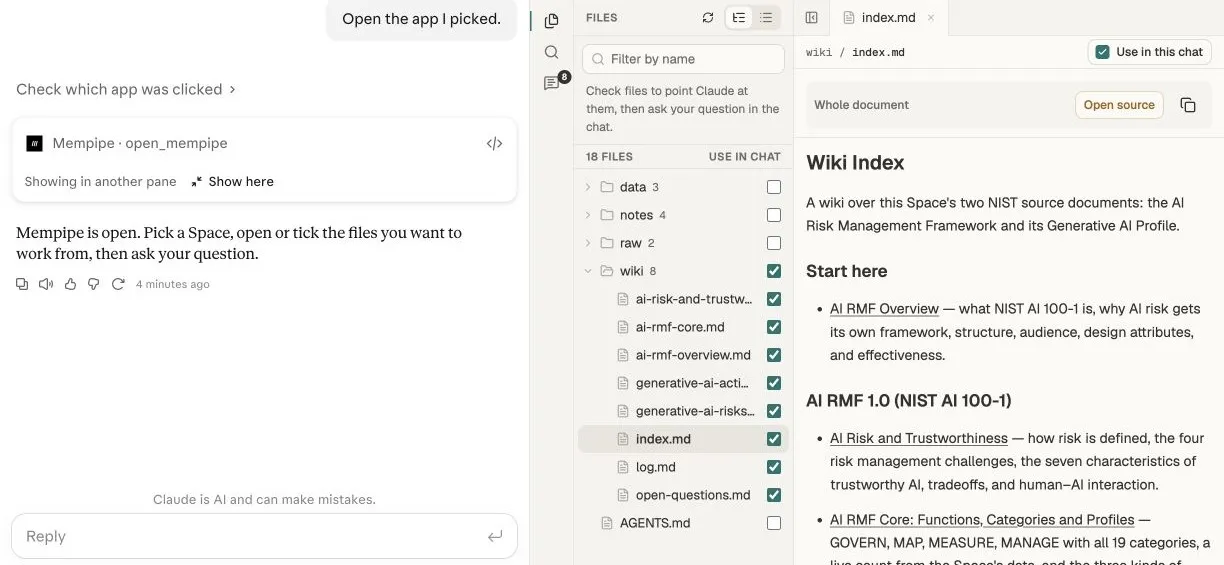
The whole wiki folder is selected for the chat, while index.md stays open in the reader.
Tools let the model search and read. The App gives me a place to browse, inspect a document, and choose what I want the conversation to use. A file tree and reader benefit from more room than an inline card provides.
I use one server for Claude and ChatGPT. Getting the same App to behave sensibly in both brought me into the details of metadata, display modes, and what each host actually supports.
Two objects, two metadata locations
The first distinction I would explain to another developer is that there are two objects, each with its own _meta.
The tool appears in tools/list. It tells the host which UI belongs to a tool call and can also declare a launcher. Here are the relevant fields:
{
  "name": "open_mempipe",
  "title": "Mempipe Notebook",
  "inputSchema": { "type": "object" },
  "_meta": {
    "ui": { "resourceUri": "ui://mempipe/library-v1" },
    "openai/ui": {
      "entrypoints": [{ "type": "global" }, { "type": "thread" }]
    }
  }
}
ui.resourceUri is the standard MCP Apps link from a tool to its interface. MCP Apps specification.
The second object is the UI resource content item, returned inside the contents array of resources/read. Its metadata describes how the host should render the interface. This abbreviated example includes the settings for both Claude and ChatGPT; the actual HTML is omitted:
{
  "uri": "ui://mempipe/library-v1",
  "mimeType": "text/html;profile=mcp-app",
  "_meta": {
    "ui": {
      "csp": {
        "connectDomains": [],
        "resourceDomains": [
          "https://fonts.googleapis.com",
          "https://fonts.gstatic.com"
        ]
      },
      "prefersBorder": true,
      "preferredDisplayMode": "fullscreen"
    },
    "openai/ui": {
      "availableDisplayModes": ["inline", "fullscreen"],
      "preferredDisplayMode": "fullscreen"
    }
  }
}
The location is part of the contract. These rendering fields belong on the content item returned by resources/read. Putting them on the tool, the outer response, or the resources/list entry does not put them where the host expects to read them.
Once the UI loads, the next step happens in the App’s frontend, running inside the iframe. It sends a ui/initialize request to the host application through the iframe’s postMessage bridge, with appCapabilities in the request’s params. Here is the relevant portion:
{
  "method": "ui/initialize",
  "params": {
    "appCapabilities": {
      "availableDisplayModes": ["inline", "fullscreen"]
    }
  }
}
The MCP Apps SDK accepts those capabilities as the second argument to new App(...); app.connect() sends the initialisation request. This is communication between the embedded UI and Claude or ChatGPT as the host application, not a call to the language model. It tells the host which modes the UI supports. MCP Apps SDK.
The resource metadata comes from the server, while appCapabilities arrives from the running frontend. That timing is why the static resource fields are useful: the host can read them before the App finishes loading. OpenAI’s resource reference.
This is the map I wish I had started with:
| Where | Key | Fields | Defined by / used by |
|---|---|---|---|
Tool in tools/list |
ui |
resourceUri, visibility |
MCP Apps standard |
Tool in tools/list |
openai/ui |
entrypoints |
OpenAI extension; Claude also reads global |
| Resource content item | ui |
csp, prefersBorder |
MCP Apps standard |
| Resource content item | ui |
preferredDisplayMode |
Claude extension |
| Resource content item | openai/ui |
availableDisplayModes, preferredDisplayMode |
OpenAI extension |
App frontend → host (ui/initialize) |
appCapabilities |
availableDisplayModes |
MCP Apps standard |
The repeated openai/ui key is intentional. On the tool it declares entry points. On the resource it describes display modes. They are different objects with different jobs.
Opening beside the chat
For Claude’s side panel, the small piece that matters is this, on the resource content item:
{
  "_meta": {
    "ui": { "preferredDisplayMode": "fullscreen" }
  }
}
In this setting, fullscreen requests the side panel beside the conversation. Claude also reports fullscreen when a view fills the chat area, so the mode name alone does not tell you its size. This preference is a Claude extension, and the docs warn that where you declare it may change. Claude’s display-mode documentation.
The preference is conditional. Claude tries to move the App into the side panel once, after the view starts and the tool call returns successfully. The App must support fullscreen. It can stay inline if another connector or artifact occupies the panel, the window is narrow, the panel is unavailable, or the user previously closed a panel showing this connector in the conversation. A newer view from the same connector can replace the one already open.
ChatGPT uses a different resource field: _meta["openai/ui"]. According to OpenAI’s display-mode specification, listing both inline and fullscreen defaults to fullscreen unless a preference says otherwise. Omitting openai/ui entirely preserves the older inline default. Launching through an entry point uses fullscreen.
On ChatGPT web, full screen opens as a side panel beside the conversation.
There is no picture-in-picture mode in ChatGPT’s current extension: the spec supports inline and fullscreen, but not pip. Adding pip to an App’s metadata cannot make a host offer it.
Launching from Artifacts
The openai/ui entry points on the tool are an OpenAI extension. ChatGPT uses them for global and thread launchers. Despite the namespace, Claude also recognises the global entry point. Claude entry-point documentation.
One detail I particularly like is that Mempipe Notebook gets its own tile on Claude’s Artifacts page, alongside Docs, Sheets, and Whiteboard. People can open it directly and pin it to the sidebar. That gives the workbench a starting point before anyone types a prompt. The global entry in the tool’s metadata enables this through a publicly documented host extension shared by Claude and ChatGPT. Claude’s entry-point documentation.
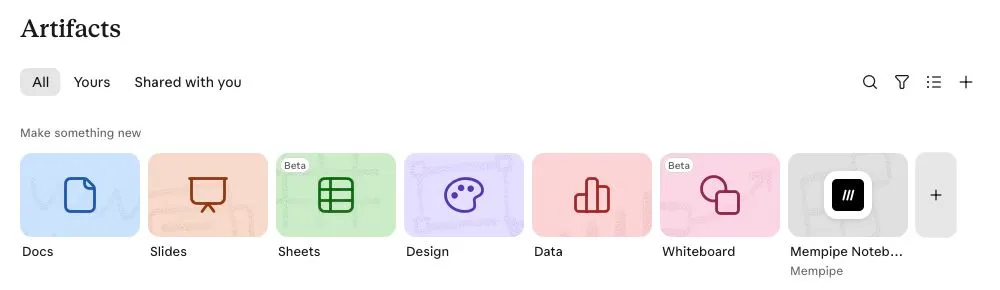
The launcher represents the App. Claude documents one entry per marked tool. I haven’t found a documented MCP Apps API for registering the documents inside it as individual saved artifacts, so Mempipe’s file tree remains inside Notebook. Claude’s entry-point documentation.
For that launch path, the tool needs to accept {}: make every input optional and give the App a useful starting view. Keep ui.resourceUri pointing at the UI resource, and omit ui.visibility or include "model".
The tool’s title matters outside the conversation, too. ChatGPT chooses the launcher label from title, then annotations.title, then name. OpenAI’s title rules.
Launcher discovery has its own conditions. The connector must be added by URL as a custom connector, or installed from a directory listing marked Verified. Installing it from a Community listing does not qualify.
Users also need the unified Claude experience, with Chat and Cowork combined, and their organisation must have access to entry points. An App can still work in a conversation without an Artifacts launcher.
After you add or edit entry-point metadata, changes can take up to about two hours to appear. The connector’s “Refresh tools list” action picks them up immediately for your account; it does not grant missing feature access. Claude shows no error when an app is absent from the Artifacts page. Claude’s entry-point documentation.
We submitted Mempipe’s connector and MCP App to the Claude directory two weeks ago and are still waiting for approval. Hopefully soon.
Compatibility details
Some of the smaller compatibility details were just as useful to learn.
A custom ui.domain can prevent Claude from rendering the App. Claude expects a particular sandbox hostname: the first 32 hexadecimal characters of the SHA-256 hash of the full connector URL, followed by .claudemcpcontent.com. An arbitrary domain fails validation. I leave ui.domain out of our shared resource metadata and supply ChatGPT’s dedicated origin through openai/widgetDomain. Claude’s domain validation rules.
Font loading is part of the sandbox configuration. ChatGPT’s sandbox blocked inline data: fonts, so the App loads Geist from Google Fonts and declares the stylesheet and font origins in resourceDomains. That setup works in both hosts.
Opening a link includes a user decision. In Claude, ui/open-link shows an “Open external link” confirmation. Directory connectors can allowlist destinations to skip the confirmation. Opening the link still requires a user action, such as a click. Custom connectors still show the confirmation. The user can cancel, so I want the App’s message to acknowledge that the link wasn’t opened without making them feel something broke. Claude’s external-link documentation.
App-only helpers can stay out of the model’s tool list. A helper marked with _meta.ui.visibility: ["app"] is available to the App without being exposed to the model. Our server only lists those helpers to clients declaring the io.modelcontextprotocol/ui extension. MCP Apps tool visibility.
The connection back to the conversation is what makes the workbench useful. Mempipe Notebook sends ui/update-model-context a text note identifying the open Space and the selected file paths or folder patterns. It asks Claude to search those sources first and read their contents through Mempipe’s tools. The note itself contains no document contents.
We’ve wanted more control over which sources ChatGPT and Claude search, draw answers from, and cite. Mempipe Notebook brings that choice into the conversation, and we’ll keep improving the workflow.