By Stan Chang · · Updated · 4 min read · #ios-development
Why UITapGestureRecognizer Has No Touch-Down State
Discrete recognition, continuous feedback, and the boundary with UIButton
UIButton for button behavior; use a continuous recognizer only when the interaction genuinely requires gesture states.In 2015, I used a long-press recognizer to make an arbitrary view behave like a button. The state-model observation was sound. The abstraction was not.
The important distinction is not tap versus long press. It is discrete versus continuous recognition.
- A discrete recognizer moves from
possibletorecognizedorfailed. It does not have abeganphase. - A continuous recognizer can fail before it begins, or move through
beganandchangedbefore it reachesendedorcancelled.
That difference explains why a UITapGestureRecognizer cannot highlight a view as soon as the finger touches down: it recognizes the tap only after the touch sequence succeeds.
The gesture-recognizer state machine
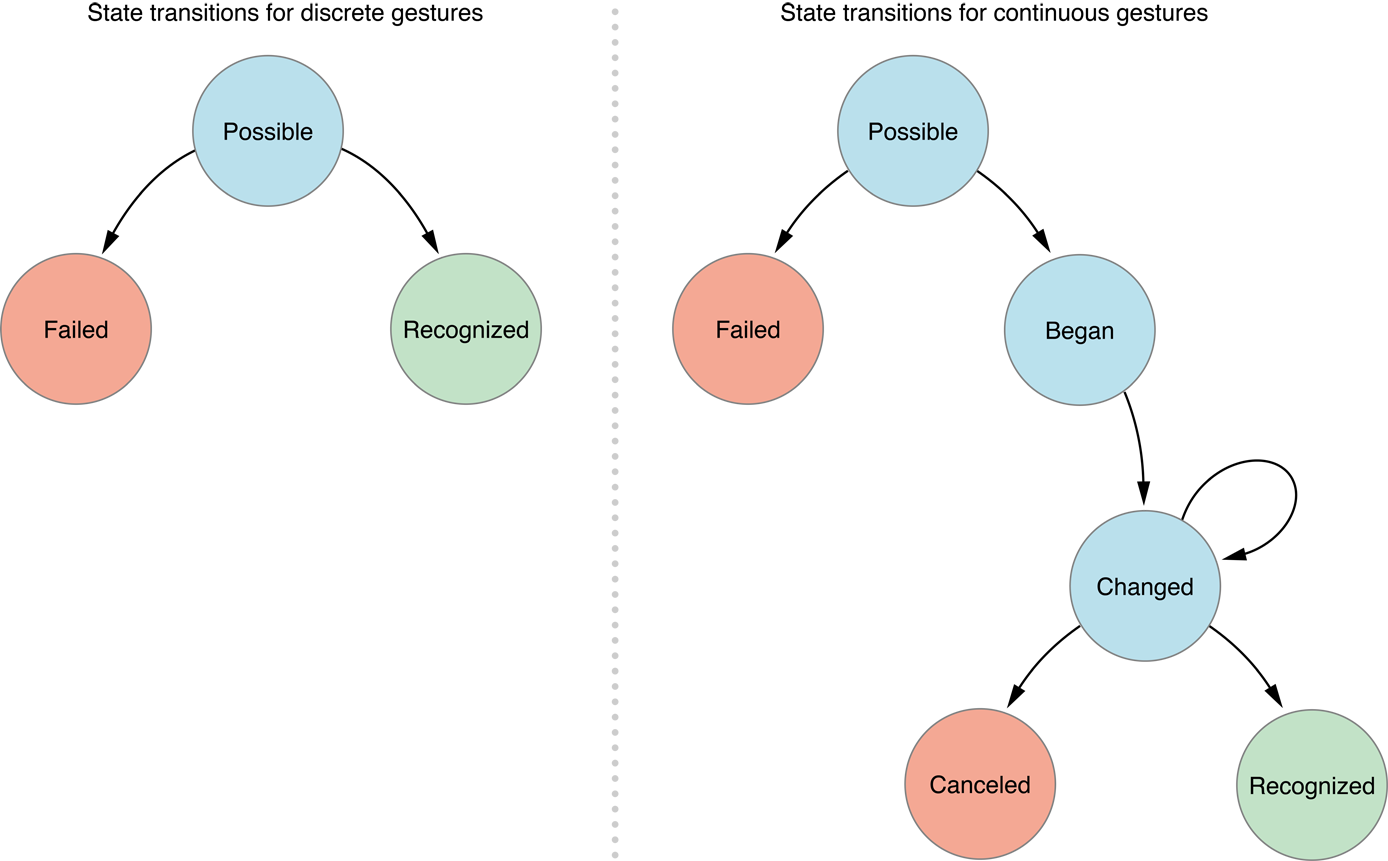
The discrete and continuous state paths described by Apple's current UIGestureRecognizer.state documentation.
Apple’s state documentation defines the paths precisely:
| Kind | State path | Example |
|---|---|---|
| Discrete | possible → recognized or failed |
tap, swipe |
| Continuous | possible → failed, or possible → began → zero or more changed → ended or cancelled |
pan, pinch, long press |
A discrete recognizer sends one action only when it reaches recognized. A continuous recognizer sends actions at began and each later changed, ended, or cancelled transition. A transition from possible to failed sends no action, so a target-action handler never receives .failed.
When a continuous recognizer is appropriate
UILongPressGestureRecognizer is continuous. It enters began after minimumPressDuration, emits changed as the finger moves, and finishes with ended when the finger lifts. For a custom press surface, setting the duration to zero provides state updates from the start of the press:
let press = UILongPressGestureRecognizer(
    target: self,
    action: #selector(handlePress(_:))
)
press.minimumPressDuration = 0
customView.addGestureRecognizer(press)

@objc private func handlePress(_ gesture: UILongPressGestureRecognizer) {
    guard let view = gesture.view else { return }

    let location = gesture.location(in: view)
    let isInside = view.bounds.contains(location)

    switch gesture.state {
    case .began, .changed:
        view.alpha = isInside ? 0.6 : 1
    case .ended:
        view.alpha = 1
        if isInside {
            activateCustomInteraction()
        }
    case .cancelled:
        view.alpha = 1
    default:
        break
    }
}
This deliberately turns a long-press recognizer into a general press tracker. It is useful only when the interaction genuinely needs gesture states. It can also compete with scrolling or other recognizers, so coordinate recognizer dependencies when the view sits inside a larger gesture system.
If it acts like a button, use a button
The original version of this article used a custom recognizer to imitate UIControl events. That is unnecessary for a normal tap action and makes it easier to miss accessibility, focus, pointer, keyboard, cancellation, and disabled-state behavior.
Use UIButton or another UIControl when the surface activates an action. A custom button can still own any visual treatment:
final class HighlightingButton: UIButton {
    override var isHighlighted: Bool {
        didSet {
            alpha = isHighlighted ? 0.6 : 1
        }
    }
}
What the original experiment taught me
The long-press technique came from inspecting how UISwitch handled press feedback. The useful observation was the natural mapping between continuous gesture states and control touch phases: began can start feedback, changed can track whether the finger remains inside, and ended or cancelled can clear it.
The first version of this article took that experiment further and built LXTouchGestureRecognizer to imitate UIControl events. It was a useful way to understand the state machine, but it also rebuilt behavior UIKit already provides. The current recommendation keeps the diagnostic insight and retires the unnecessary abstraction.
The original Objective-C implementation remains available in my gist. Sumolari was kind enough to turn the experiment into a repository and publish it as the LXTouchGestureRecognizer CocoaPod. Thank you, Sumolari, for doing the work to make it installable for others.
Historical code: I no longer maintain
LXTouchGestureRecognizerand do not endorse it for new projects. The gist, repository, and pod are preserved here for provenance and for anyone maintaining legacy code.
The reusable rule is simple: choose a recognizer for gesture semantics and a control for control semantics. The state machine tells you why a tap recognizer cannot provide touch-down feedback; it does not require rebuilding a button.